Pre-refinement for PyExtal-JAX
Before performing full gradient-based refinement with pyextal-jax, it is crucial to obtain rough estimates for experimental parameters such as sample thickness, intensity scale, background, and the precise geometric orientations of the data. This pre-refinement process utilizes the core pyextal modules.
This notebook demonstrates the pre-refinement workflow using an experimental silicon [110] zone-axis dataset. The outputs of this notebook (geometry.npy and simgrid.npy) will be directly used to initialize the pyextal-jax optimization engine.
1. Import Dependencies
We start by importing the necessary pyextal modules for data loading, defining regions of interest (ROI), and performing coarse/fine optimization.
[1]:
import numpy as np
import matplotlib.pyplot as plt

from pyextal.dinfo import LARBEDDiffractionInfo
from pyextal.roi import LARBEDROI
from pyextal.optimize import CoarseOptimize, FineOptimize
from pyextal.gof import  Chi2_LARBED


plt.rcParams['image.cmap'] = 'inferno'
2. Define Data Paths
Set the paths to the experimental dataset.
[2]:
from pathlib import Path
box_path = Path("box/20260509/w021/doped9")
prefix = "ri_3_ro5-7"
3. Load Data
Load the LARBED diffraction patterns (dp), the corresponding variance maps (variance), and the indices of the reciprocal lattice vectors (gindex). It is important to ensure there are no zero or negative values in the experimental data to avoid issues during logarithm or division operations in the cost function.
[3]:
dp = np.load( box_path / f"{prefix}_Store_Larbed.npy")
dp = np.flip(dp,axis=2)
variance = np.load(box_path / f"{prefix}_Store_LarbedVariance.npy")
variance = np.flip(variance,axis=2)
gindex = np.load(box_path / f"{prefix}_g_vectors.npy")
# make sure no zero or negative values
dp[dp < 1] = 1
4. Inspect Reciprocal Lattice Vectors
Print the list of reciprocal lattice vectors included in the dataset to identify specific reflections of interest.
[4]:
for i, g in enumerate(gindex):
    print(i, g)
0 [ 3 -3 -7]
1 [ 4 -4 -6]
2 [ 1 -1 -7]
3 [ 2 -2 -6]
4 [ 3 -3 -5]
5 [ 4 -4 -4]
6 [ 0  0 -6]
7 [ 1 -1 -5]
8 [ 2 -2 -4]
9 [ 3 -3 -3]
10 [ 4 -4 -2]
11 [-2  2 -6]
12 [-1  1 -5]
13 [ 0  0 -4]
14 [ 1 -1 -3]
15 [ 2 -2 -2]
16 [ 3 -3 -1]
17 [ 4 -4  0]
18 [ 5 -5  1]
19 [-4  4 -6]
20 [-3  3 -5]
21 [-2  2 -4]
22 [-1  1 -3]
23 [ 0  0 -2]
24 [ 1 -1 -1]
25 [ 2 -2  0]
26 [ 3 -3  1]
27 [ 4 -4  2]
28 [ 5 -5  3]
29 [-5  5 -5]
30 [-4  4 -4]
31 [-3  3 -3]
32 [-2  2 -2]
33 [-1  1 -1]
34 [0 0 0]
35 [ 1 -1  1]
36 [ 2 -2  2]
37 [ 3 -3  3]
38 [ 4 -4  4]
39 [ 5 -5  5]
40 [-5  5 -3]
41 [-4  4 -2]
42 [-3  3 -1]
43 [-2  2  0]
44 [-1  1  1]
45 [0 0 2]
46 [ 1 -1  3]
47 [ 2 -2  4]
48 [ 3 -3  5]
49 [ 4 -4  6]
50 [-5  5 -1]
51 [-4  4  0]
52 [-3  3  1]
53 [-2  2  2]
54 [-1  1  3]
55 [0 0 4]
56 [ 1 -1  5]
57 [ 2 -2  6]
58 [-5  5  1]
59 [-4  4  2]
60 [-3  3  3]
61 [-2  2  4]
62 [-1  1  5]
63 [0 0 6]
64 [-4  4  4]
65 [-3  3  5]
66 [-2  2  6]
67 [-1  1  7]
68 [-4  4  6]
69 [-3  3  7]
5. Visual Inspection and Alignment
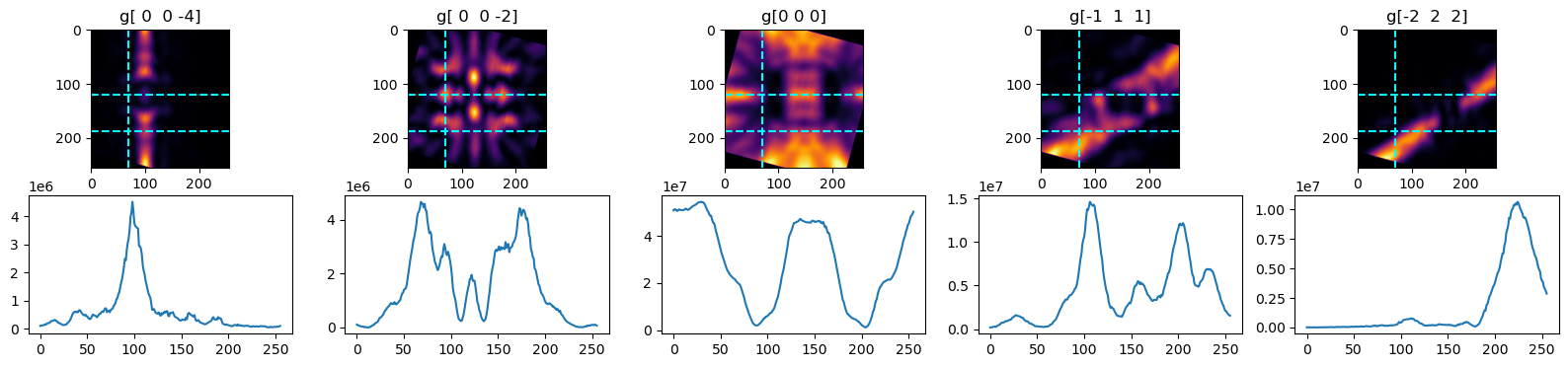
Visualize selected diffraction disks. We apply a rotation to align the features horizontally/vertically, which aids in selecting the correct regions of interest (ROI) and setting the proper reference vectors.
[5]:
from skimage.transform import rotate
fig, axes = plt.subplots(2, 5, figsize=(20, 4))
angle = 7
for idx, i in enumerate([13,23,34,44,53]):
    axes[0,idx].imshow(rotate(dp[i], -112.07 + angle))
    axes[0,idx].hlines([120, 187], xmin=0, xmax=dp[i].shape[1], color='cyan', linestyle='--')
    axes[0,idx].vlines(70, ymin=0, ymax=dp[i].shape[0], color='cyan', linestyle='--')
    axes[0,idx].set_xlim(0, dp[i].shape[1])
    axes[0,idx].set_ylim(dp[i].shape[0], 0)
    axes[0,idx].set_title(f"g{gindex[i]}")

    axes[1,idx].plot(rotate(dp[i], -112.07 + angle)[120,:])
6. Initialize Diffraction Info
Create a LARBEDDiffractionInfo object. This object parses the initial crystal parameters from the .dat file (e.g., si110.dat) and binds the experimental data and variance maps to the simulation framework.
[6]:
dinfo = LARBEDDiffractionInfo(dp,  400,  0, 0, 89.99, 'si110.dat', gindex, varianceMaps=variance)
# 004 88.13
7. Define Region of Interest (ROI) Parameters
Define the overall rotation angle determined from the visual inspection and explicitly list the specific reflections (gInclude) that we want to include in the refinement process. Excluding very weak or overlapping beams can improve stability.
[7]:
rotation = -112.07 + angle #- 87.6643

gInclude = [
    (0, 0, 0),
    (1, -1, -1),
    (-1, 1, -1),
    (1, -1, 1),
    (-1, 1, 1),
    (0, 0, -2),
    (0, 0, 2),
    (2, -2, 0),
    (-2, 2, 0),
    (1, -1, -3),
    (-1, 1, -3),
    (1, -1, 3),
    (-1, 1, 3),
    (2, -2, -2),
    (-2, 2, -2),
    (2, -2, 2),
    (-2, 2, 2),
    (0, 0, -4),
    (0, 0, 4),
    (3, -3, -1),
    (3, -3, 1),
    (-3, 3, -1),
    (-3, 3, 1),
    (2, -2, -4),
    (-2, 2, -4),
    (2, -2, 4),
    (-2, 2, 4),
    (1, -1, -5),
    (3, -3, -3),
    (-1, 1, -5),
    (-3, 3, -3),
    (3, -3, 3),
    (1, -1, 5),
    (-3, 3, 3),
    (-1, 1, 5),
    (4, -4, 0),
    (-4, 4, 0),
    (0, 0, -6),
    (4, -4, -2),
    (4, -4, 2),
    (-4, 4, -2),
    (-4, 4, 2),
    (0, 0, 6),
    (3, -3, -5),
    (-3, 3, -5),
    (3, -3, 5),
    (-3, 3, 5),
    (2, -2, -6),
    (-2, 2, -6),
    (2, -2, 6),
    (-2, 2, 6),
    (4, -4, -4),
    (-4, 4, -4),
    (4, -4, 4),
    (-4, 4, 4)

]
[8]:
len(gInclude)
[8]:
55
Initialize the LARBEDROI object, providing the diffraction info, the calculated rotation, a reference reciprocal vector (gx), and the list of beams to include.
[9]:
roi = LARBEDROI(dinfo=dinfo, rotation=rotation, gx=np.array([0,0,-4]), gInclude=gInclude)
include beam initialized
group symmetry initialized
roi.selectROI(np.array([[[75,80], [75, 205], [240,80], [126,166]]]),)
8. Select and Display ROI
Select specific sub-regions within the diffraction disks to focus the optimization on the most informative features (e.g., specific deficiency lines) while ignoring noisy or irrelevant areas. displayROI() visualizes the selected regions.
[15]:
roi.selectROI(np.array([[[60,80], [60, 265], [230,80], [186,171]]]))
roi.displayROI()

9. Coarse Optimization
Initialize the CoarseOptimize class. This class performs a grid search or low-resolution optimization to find initial estimates for macroscopic parameters.
[16]:
coarse = CoarseOptimize(dinfo=dinfo, roi=roi, )

Execute the coarse optimization to estimate the sample thickness and refine the geometric orientation parameters.
[17]:
coarse.optimizeOrientationThickness()
Optimization terminated successfully;
The returned value satisfies the termination criteria
(using xtol = 0.001 )
check
thickness: 351.1036956625432, gl: 89.99, tiltY: -0.06323883446571354, tiltX: 0.16261414576897737
Visualize the results of the coarse search, typically showing the error landscape over the parameter grid.
[18]:
coarse.displayCoarseSearch()

10. Fine Optimization (Pre-refinement)
Initialize the FineOptimize class. Although we will do the final structure factor refinement in JAX, doing a preliminary fine optimization here on a small subset of reflections helps to nail down the precise scale, background, and minor shifts.
[19]:
reflection_list = [(0,0,-4)]
fine = FineOptimize(dinfo=dinfo,
                    roi=roi,
                    reflections=reflection_list,
                    sfMask=np.array([[True, False, True, False]]),
                    errorFunc=Chi2_LARBED(roi=roi),
                    perturbROI=True,
                    symUpdate=False,
                    noncentro=True,
                    shiftDisk=False

                    )
Retrieve the initial parameters (x0), evaluate the structure factors, and run the fine optimization specifically for the ROI geometry and basic parameters.
[20]:
fine.getx0()
fine.evaluateSF(fine.x0)
fine.optimize_roi()
start optimization
gl: 90.90551 rotation: -105.36607
corner: 1.89001 -1.52445
11. Review Results
Print the refined parameters: thickness, intensity scale, background, orientation parameters (gl), disk shifts, and final rotation angle.
[21]:
print(fine.thickness,fine.errorFunc.scale,fine.errorFunc.background,roi.gl,roi.allshift,roi.rotation)
351.70121156240157 79333163.3774467 15342.145598015932 90.90550957842167 [[ 1.89000842 -1.52444578]] -105.36606854111572
Generate a visual comparison between the experimental ROI (regionExp) and the simulated ROI (regionSim) using the newly refined parameters.
[22]:
regionExp, regionSim = fine.display(lines=[50,100,150])
(0, 0, -4): |U| 0.0271888 angle(U) 180.0000000 |UA| 0.0005143 angle(UA) 0.0000000
evaluating bloch wave...
evaluating intensity...
displaying result...
Chi Square single background LARBED: 44.15267

(0, 0, -4): |U| 0.0271337 angle(U) 180.0000000 |UA| 0.0005133 angle(UA) 0.0000000 Chi Square single background LARBED: 29.39788
12. Export Data for PyExtal-JAX
Save the crucial outputs required for the pyextal-jax refinement engine.
simgrid.npy: The refined geometric orientations for each pixel.templates.npy: The cropped experimental data.variance.npy: The corresponding variance maps.roi.npy: The ROI bounding boxes.geometry.npy: The refined global parameters (thickness, scale, background, etc.).
[ ]:
from pyextal.hdf5io import save_raw, save_pre_refinement

h5path = box_path / f"{prefix}.h5"
save_raw(h5path, dp, variance, gindex, prefix=prefix, crystal_dat="si110.dat")
save_pre_refinement(h5path, roi, fine, gInclude)
13. Cleanup
Terminate the underlying Fortran Bloch wave engine to free up resources.
[24]:
from pyextal.callBloch import terminate
terminate()
[ ]: